Improving the Command Line Experience in MS-DOS
For those coming from Linux or modern systems, returning to MS-DOS can be a somewhat frustrating experience. We're used to advanced shells like Bash, Zsh, or Fish, which offer command history, autocompletion, aliases, prompt customization, colors, powerful scripting, and a huge collection of built-in tools.
In comparison, the standard MS-DOS command interpreter, COMMAND.COM, seems extremely basic. The classic C:\> prompt offers few conveniences, and many of the features we take for granted today simply didn't exist in the early versions of the system.
However, as MS-DOS evolved, Microsoft incorporated several utilities designed to improve the user experience. Furthermore, the community developed numerous tools that significantly expanded the capabilities of the command-line environment.
In this article, we'll review both the improvements included in MS-DOS and some third-party tools that allow you to transform a basic DOS environment into a much more comfortable and productive platform.
Improvements available in MS-DOS
DOSKEY: History and Macros
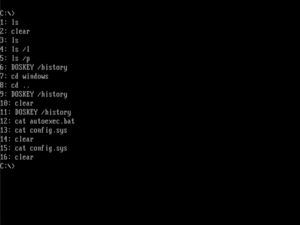
Introduced in MS-DOS 5.0, DOSKEY was probably the most significant improvement for command-line users.
Once loaded via:
DOSKEY
Allows you to: - Navigate the history using the cursor keys.
- View the complete history with F7.
- Recall previous commands.
- Create aliases and macros.
For example:
|
| Language: Bash |
|
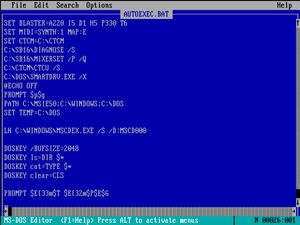
1 | DOSKEY /BUFSIZE=2048 --> History size, cleared on reboot
2 | DOSKEY ls=DIR $*
3 | DOSKEY cat=TYPE $*
4 | DOSKEY clear=CLS
|
|
|
This makes it possible to use commands that are more familiar to Unix users.
Prompt Customization
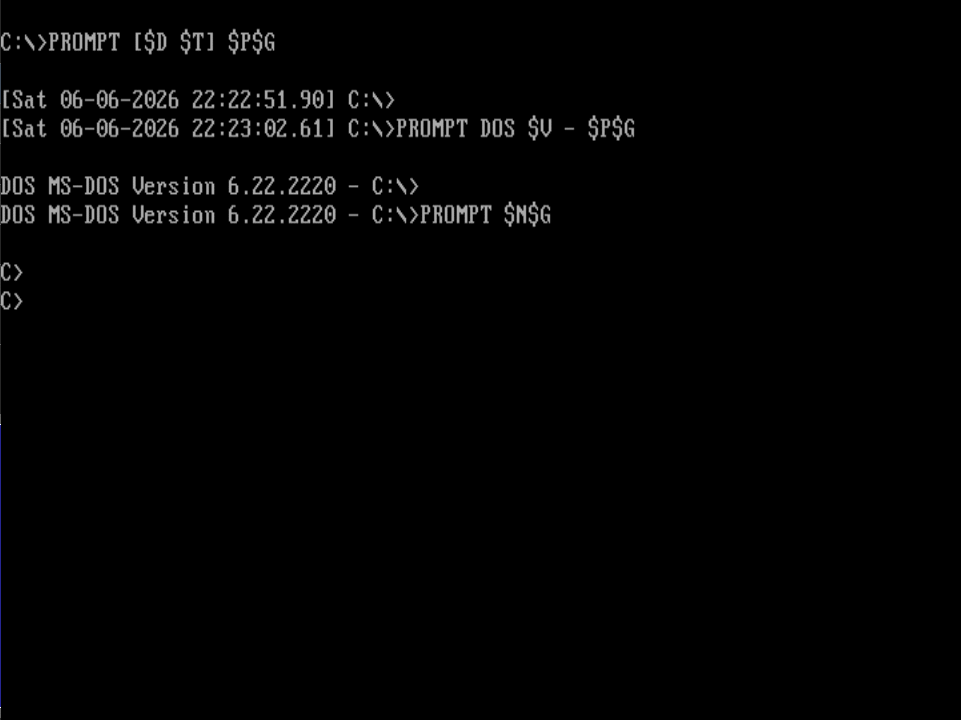
MS-DOS includes the PROMPT command, which allows you to modify the information displayed on the command line.
Some useful vars are:
| Code |
Description |
| $P | Current path |
| $N | Current drive |
| $G | Symbol > |
| $D | Date |
| $T | Time |
| $V | DOS Version |
Examples:
|
| Language: Bash |
|
 1 | Classic Prompt:
 2 | PROMPT $P$G
 3 |
 4 | Show date and time:
 5 | PROMPT [$D $T] $P$G
 6 |
 7 | Show DOS version:
 8 | PROMPT DOS $V - $P$G
 9 |
10 | Minimalist Prompt:
11 | PROMPT $N$G
|
|
|
ANSI.SYS and Colors
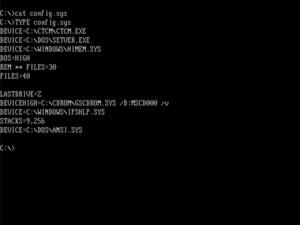
By default, COMMAND.COM does not support colors in the prompt. However, MS-DOS includes the ANSI.SYS driver.
To enable it, add this line to the CONFIG.SYS file.
|
| Language: Bash |
|
1 | DEVICE=C:\DOS\ANSI.SYS
|
|
|
Once loaded, you can use ANSI sequences to change colors, move the cursor, or create more elaborate interfaces.
Customization examples:
|
| Language: Bash |
|
1 | Current route in green:
2 | PROMPT $E[32m$P$E[0m$G
3 |
4 | Time in yellow and route in cyan:
5 | PROMPT $E[33m$T $E[36m$P$E[0m$G
6 |
7 | Retro terminal-style prompt:
8 | PROMPT $E[1;32m[$T] $P$E[0m$G
|
|
|
Automation with AUTOEXEC.BAT
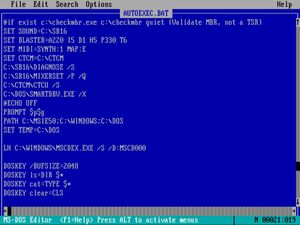
Another important improvement is the use of AUTOEXEC.BAT to automatically load custom configurations at system startup.
For example:
|
| Language: Bash |
|
1 | DOSKEY
2 | PROMPT [$T] $P$G
3 | PATH C:\DOS;C:\UTIL
|
|
|
This allows for maintaining a consistent environment between reboots.
Improvements with Additional Tools
Although the tools included in MS-DOS are useful, the biggest improvements come from third-party applications.
4DOS
Probably the most significant enhancement ever created for DOS.
Features: - Advanced history.
- Tab completion.
- Permanent aliases.
- Extended variables.
- Improved scripting.
- Color support.
- Advanced line editing.
For many users, installing 4DOS was as important as installing a graphical environment.
Customization examples:
Prompt with colors and time:
[14:32] C:\GAMES>
Prompt with system information:
DOS 6.22 | MEM: 580K FREE | C:\>
Multilevel Prompt:
┌─ C:\DOS
└─>
NDOS
Distributed as part of Norton Utilities, NDOS was based on 4DOS and included virtually the same advantages.
Many Norton users ended up using NDOS as a permanent replacement for COMMAND.COM.
FreeCOM
The shell used by FreeDOS.
It offers numerous modern improvements over COMMAND.COM and is especially interesting for those currently using retro hardware.
Advanced ANSI Utilities
There are several programs that extend the capabilities of ANSI.SYS:- NANSI.SYS
- FANSI-CONSOLE
- ANSI Plus
These tools offer increased speed and additional features for advanced text interfaces.
Editors and Complementary Tools
To bring DOS closer to a more modern experience, it is also common to install: - Advanced editors such as QEdit.
- Network clients such as mTCP.
- Compression tools such as PKZIP.
- File managers such as Norton Commander.
- Advanced text viewers.
Conclusion
Although COMMAND.COM is extremely simple compared to Bash or Zsh, later versions of MS-DOS incorporated several tools that significantly improve the user experience. Features like DOSKEY, PROMPT, and ANSI.SYS provide history, macros, visual customization, and basic automation.
However, the true potential emerges when these features are combined with tools like 4DOS or NDOS, which add autocompletion, advanced aliases, improved scripting, and much deeper customization. With a few modifications, even an operating system designed over forty years ago can become a surprisingly comfortable environment to work in.
Comments (0)
No comments yet.